Showing posts with label Blogger. Show all posts

Thursday, 26 March 2015

How to Use GitHub for Hosting Files?


Google Code is expired now. You can not host any files on Google Code now and in next year on Jan 25, 2016 Google will completely shut down their Google Code Service. This is a bi issue for those using Google Code for hosting their JavaScript, CSS, etc Files even personal project. Next Year, all files that are on Google Code will deleted permanently. Google was also sent an email to all their users regarding this. There are some question that came in our mind, like:
  • What to do Now?
  • How we can save our Files or projects?
  • Where to find similar platform like Google Code?


Well, there are still some places where you can save and host your files. Even better than Google Code. The name of the site GitHub. Maybe many of you know about this site but don't know that how to use it. Well, there a simple tutorial:

How to use GitHub?

#01: Sign in to GitHub or Create account.
#02: Create a new Repository. (By Click on + Icon then New Respository)


#03: Set Repository Name and Description i.e. i set name Design Devta
#04: Make it Public and Tick the Initialize this repository with a README
#05: Select Jekyll for .gitignore


#06: Create repository.
#07: Now Click branch button.
#08: Write new Branch as gh-pages
#09: Then click on Create Branch: gh-pages


#10: Click on Settings from the right side menu
#11: Choose Default Branch as gh-pages


#12: Then Scroll down to Github Pages.


#13: You Successfully Create a Github Page i.e. i created http://hsinghhira.github.io/DesignDevta/
If you click on this URL then it shows error about 404 page not found because we don't upload anything yet.
#14: Now go back to your Repository.


#15: Click on + button to create a new file.


#16: Set File name with file extension i.e. date.js, style.css, etc .js and .css is the file extensions.
#17: Paste File codes in large textarea.


#18: Then scroll down the page to the end. Click on green Commit new file button.
#19: You successfully create a file for hosting.
#20: To get files Hot Link (Direct Link), go to http://github-username.github.io/repository-name/filename i.e. http://hsinghhira.github.io/DesignDevta/date.js
#21: You have created Direct link for your file. Now you can use it for hosting purpose also.


Extra Work (Optional)

As we know, if we go to http://hsinghhira.github.io/DesignDevta/ (Example) then it shows error 404 because there is no file on that link so we will create a index file. Lets go:

#1: Click on + button for Create a new file.
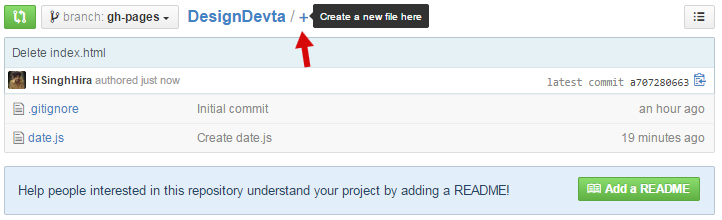

#2: Set File Name as index.html
#3: Paste redirecting codes from below in textarea.


<META content='0;URL=http://your-site-here' http-equiv='refresh'></META>

#4: Replace your-site-here with your site link/URL and Paste it in Textarea.


#5: Click on Commit new file.
#6: Done. Go to: http://github-username.github.io/repository-name 

Now if you go to my repository page (http://hsinghhira.github.io/DesignDevta) then it will redirected to this site.

Thank you for patronizing Design Devta. I am sure your visit to us must be quite satisfying and in line with your expectations from us. Just in case, it's not as you expected from us or if you are facing any problem, kindly forward your feedback's directly to us by leave a Comment below or using our Contact form. And, get assured response from my side. Your feedback's and suggestions are extremely valuable to us. This Post is written by Harman Singh Hira. There is no any source so Copying or using this post for your own site is not allowed. If anyone do so get ready for facing DMCA. Please, if you like this post then share on your social networking sites. Assuring you of our best service always.
Dual whatsapp Happy Diwali SMS Happy Diwali Whatsapp Status, SMS, Messages and Wishes Happy Diwali Shyari in Hindi

Wednesday, 25 March 2015

List of All Blogger Template's Codes


I'm a Blogger Template Designer so i know almost every Blogger Template's Code that need to build a Blogger Template. This list of Codes is very helpful for new Blogger Template Designer. Actually not only for Designers. Sometimes anyone want to show particular thing like comment numbered in his/her site. So this here is the list.

Conditional Tags

To Show something on Home Page only.
<b:if cond='data:blog.url == data:blog.homepageUrl'>
 Codes here
</b:if>

To Hide something from Home Page only.
<b:if cond='data:blog.url != data:blog.homepageUrl'>
 Codes here
</b:if>

To Show something on Post Pages.
<b:if cond='data:blog.pageType == "item"'>
 Codes here
</b:if>

To Hide something from Post Pages
<b:if cond='data:blog.pageType != "item"'>
 Codes here
</b:if>

To Show something on Pages.
<b:if cond='data:blog.pageType == "static_page"'>
Codes here
</b:if>

To Hide Something from Pages.
<b:if cond='data:blog.pageType != "static_page"'>
Codes here
</b:if>


To Show Something on particular URL.
<b:if cond='data:blog.url == "URL of the page"'>
Codes here
</b:if>

To Hide Something from Particular URL.
<b:if cond='data:blog.url != "URL of the page"'>
Codes here
</b:if>

To Show something on Post Pages and Pages.
<b:if cond='data:blog.url == data:post.url'>
Codes here
</b:if>

To Hide something from Post Pages and Pages.
<b:if cond='data:blog.url != data:post.url'>
Codes here
</b:if>

To Show Something on Home Page, Archive Page and Search Page
<b:if cond='data:blog.pageType == "index"'>
Codes here
</b:if>

To Hide Something from Home Page, Archive Page and Search Page
<b:if cond='data:blog.pageType != "index"'>
Codes here
</b:if>

To Show Something on Archive Page only.
<b:if cond='data:blog.pageType == "archive"'>
Codes here
</b:if>

To Hide Something from Archive Page only.
<b:if cond='data:blog.pageType != "archive"'>
Codes here
</b:if>

To Show Something on Error Page.
<b:if cond='data:blog.pageType == "error_page"'>
Codes here
</b:if>

To Hide Something from Error Page
<b:if cond='data:blog.pageType != "error_page"'>
Codes here
</b:if>

To Show Something on Search Page only.
<b:if cond='data:blog.searchLabel'>
Codes here
</b:if>

To Show Something on First Post only.
<b:if cond='data:post.isFirstPost'>
Codes here
</b:if>


Author Codes

Author Name:
 <data:post.author/>
Author Profile URL:
<data:post.authorProfileUrl/>
Author Image:
<data:post.authorPhoto.url/>

Time Stamp
<data:post.timestamp/>

Numbered Comments figure
<data:post.numComments/>

Full Comments Stamp
<b:if cond='data:post.allowComments'>
<b:include data='post' name='comment_count_picker'/>
</b:if>

Label(s)
<b:if cond='data:post.labels'>
<b:loop values='data:post.labels' var='label'>
<a expr:href='data:label.url' rel='tag'><data:label.name/></a><b:if cond='data:label.isLast != &quot;true&quot;'>,</b:if>
</b:loop>
</b:if>

Location
<b:if cond='data:top.showLocation'>
<b:if cond='data:post.location'>
<a expr:href='data:post.location.mapsUrl' target='_blank'><data:post.location.name/></a>
</b:if>
</b:if>

Email me
<b:if cond='data:post.emailPostUrl'>
<a expr:href='data:post.emailPostUrl' expr:title='data:top.emailPostMsg'>
<img alt='' class='icon-action' height='13' src='http://img1.blogblog.com/img/icon18_email.gif' width='18'/>
</a>
</b:if>

Post Edit Pencil Icon
<b:include data='post' name='postQuickEdit'/>

Thank you for patronizing Design Devta. I am sure your visit to us must be quite satisfying and in line with your expectations from us. Just in case, it's not as you expected from us or if you are facing any problem, kindly forward your feedback's directly to us by leave a Comment below or using our Contact form. And, get assured response from my side. Your feedback's and suggestions are extremely valuable to us. Please, if you like our this post then share on your social network. Assuring you of our best service always.

Sunday, 22 March 2015

Index your Post on Google in 3 Second [Trick]


Once you published a New Blog Post then you started waiting for Googlebot to crawl your new post to be indexed in Google. But it took many hours to index and sometimes days. This is also seen that if you have a new Blog and your traffic is not so much then Google do not index your less popular post. Now what to do in this kind of situations? Many other Bloggers give advise to submitting your Blog to Google Webmaster Tools for fast indexing but in reality, this is also not working for Less Traffic Blogs. 


But Now No-More waiting for Indexing. Here a Trick to Index your Post on Google within Seconds. I'm talking about Fetch as Google Tool in Webmaster Tools. Almost every Blogger has an account on Google Webmaster but we never saw it completely. Here I�m explaining about Fetch as Google tool, developed by Google Webmaster tools where you can submit your blog to crawl and indexed very fast. This is 100% working trick and safe. Many other sites posting many tricks to index fast through various ways but that's all tricks are illegal and against Google policies. Use this 100% safe trick.

So let's get Started

First if you do not have account on Google Webmaster Tools then Create new one and add your site to Webmaster tools. Then use below two steps:

Step 1:  Submit your Site's Sitemap.

#1: Go to Webmasters Dashboard and Click on your Site
#2: Then from the left side menu, Click on Crawl then Sitemaps.


#3: Click on Red "ADD/TEST SITEMAP" button.


#4: Enter sitemap.xml in Text field.


#5: Then Click Submit Sitemap.
#6: Refresh the Page. Done.


Step 2: Trick to Index Fast.

#1: Now, Click on Fetch as Google Option from Crawl.


#2: Enter your Post's URL but without Domain name, example below. Enter Red Text only.
http://designdevta.blogspot.com/2015/03/how-to-download-android-apps-in-pc-in.html

#3: Then Click on Fetch Button.
#4: Your URL Fetch properly.
#5: Click on Submit to index Button.


#6: A popup will Appeared. Choose Crawl only site URL Option and Click Go Button.


#7: Done.


Now your Post successfully Index on Google. If you want to check it then go to Google and Search for "site:your-post-link" or click here for example.
Note: You can only Fetch 500 URL in a Month.
Image Courtesy:  Financial Gazette

Thank you for patronizing Design Devta. I am sure your visit to us must be quite satisfying and in line with your expectations from us. Just in case, it's not as you expected from us or if you are facing any problem, kindly forward your feedback's directly to us by leave a Comment below or using our Contact form. And, get assured response from my side. Your feedback's and suggestions are extremely valuable to us. Please, if you like our this post then share on your social network. Assuring you of our best service always.

Monday, 16 March 2015

Add Review Schema in Blogger Templates


I'm hesitant to either use superlatives or make predictions concerning search engine innovations, but the joint announcement by Google, Yahoo and Bing introducing schema.org is, in my opinion, pretty big news.  Schema.org at once provides a mechanism by which semantic web technologies can become a lot more mainstream, and at the same time offers the possibility of superior search visibility for search marketers that embrace this standardized, structured on-page markup.


We all know that Schema SEO used for WordPress is easy. There are lots of plugin for WordPress to improve SEO for Site. But we can't say that Blogger Templates has lack of SEO setting. Almost all premium templates and few free templates too has good SEO setup for better indexing Blogger Blog.

But, there is something that still do have in Blogger Templates reagarding SEO Schema. That is 'Review Schema". If you ever search on Google about IMDB Movie then you must saw the rating stars, votes, etc on Google Search result. 


I added these Schema Review codes in my this Blog and hureee! Google start indexing my posts with review. Check the image below or click here


How to add it on Blogger?

Well, good question. We can't add votes on blogger but atleast we can add Stars, Rating and Reviewed by in Blogger. Here are some simple codes. Add them in Blogger Template above or below <data:post.body/> Tag.

<div style='height:0px;visibility: hidden;'>
<div itemscope='' itemtype='http://data-vocabulary.org/Review'>
<span itemprop='itemreviewed'><data:post.title/></span><br/>
<span itemprop='reviewer'><data:post.author/></span><br/>
<span itemprop='rating'>5</span> of 5
<div itemprop='description'><data:post.snippet/></div>
</div></div>

You can use Google's Structured Data Testing Tool to check my site Review Schema.


I hope this will helps you too. If you have any suggestions then please share with us. This Trick is found by Harman Singh Hira so anyone using the above codes without giving proper credit-back link to me or my site would have to face some legal issue. Therefore, do respect the work.

Thank you for patronizing Design Devta. I am sure your visit to us must be quite satisfying and in line with your expectations from us. Just in case, it's not as you expected from us or if you are facing any problem, kindly forward your feedback's directly to us by leave a Comment below or using our Contact form. And, get assured response from my side. Your feedback's and suggestions are extremely valuable to us. Please, if you like our this post then share on your social network. Assuring you of our best service always.

Saturday, 14 March 2015

Punjab Press Blogger Template v4.1


Punjab Press Template is a well known Blogger Template used by more 10k Users. Template fit for all kind of Blogging Style. Beautiful Eye Catching Responsive Design Compatible with all Ads Sizes. Simple and Understandable Admin Layout Panel. You can change its Color from Orange to any through Template Designer. Template Supported RTL (Right to Left) Support for Urdu, Arabic, etc Languages Sites. Check more Features below:-


Features:
  1. Responsive
  2. Superb SEO Friendly
  3. Simple Admin Layout Panel
  4. Unlimited Colors
  5. Ads Ready
  6. Widgets Ready
  7. Custom Styled Widgets
  8. Lightweight Read More
  9. JSON Search Result
  10. Sitemap and Archive Page
  11. Social Icons
  12. RTL Support
  13. Custom 404 Page
  14. Compatible with Major Browsers 
  15. Neat and Clean Documentation
  16. Forum Support for Buyers
  17. Trusted by 10,000+ Users

Demo and Download


Thank you for patronizing Design Devta. I am sure your visit to us must be quite satisfying and in line with your expectations from us. Just in case, it's not as you expected from us or if you are facing any problem, kindly forward your feedback's directly to us by leave a Comment below or using our Contact form. And, get assured response from my side. Your feedback's and suggestions are extremely valuable to us. Please, if you like our this post then share on your social network. Assuring you of our best service always.

Thursday, 12 March 2015

Google Code Shutting Down Soon

Google Code shutting down on Jan 25, 2016. For Blogger template developers, Google Code is used to host javascript and CSS files. There are almost 70% of Blogger Template that run with the help of Google Code and if Google soon closed this service then many Blogger templates will stop working. Google give us a to export our Google Code work to Github but this is not possible for all. Below is the Email sent be Google regarding my Google Code Projects.
Hello,
Earlier today, Google announced we will be turning down Google Code Project Hosting. The service started in 2006 with the goal of providing a scalable and reliable way of hosting open source projects. Since that time, millions of people have contributed to open source projects hosted on the site.
But a lot has changed since 2006. In the past nine years, many other options for hosting open source projects have popped up, along with vibrant communities of developers. It�s time to recognize that Google Code�s mission to provide open source projects a home has been accomplished by others, such as GitHub and Bitbucket.
We will be shutting down Google Code over the coming months. Starting today, the site will no longer accept new projects, but will remain functionally unchanged until August 2015. After that, project data will be read-only. Early next year, the site will shut down, but project data will be available for download in an archive format.
As the owner of the following projects, you have several options for migrating your data.
  1. Project 1
  2. Project 2
The simplest option would be to use the Google Code Exporter, a new tool that will allow you to export your projects directly to GitHub. Alternatively, we have documentation on how to migrate to other services � GitHub, Bitbucket, and SourceForge � manually.
For more information, please see the Google Open Source blog or contact google-code-shutdown@google.com.
-The Google Code team
Thank you for patronizing Design Devta. I am sure your visit to us must be quite satisfying and in line with your expectations from us. Just in case, it's not as you expected from us or if you are facing any problem, kindly forward your feedback's directly to us by leave a Comment below or using our Contact form. And, get assured response from my side. Your feedback's and suggestions are extremely valuable to us. Please, if you like our this post then share on your social network. Assuring you of our best service always.

Tuesday, 10 March 2015

Animated Stylish Social Icons without CSS/JS

We all want stylish-animated Social Icons for our site. Icons that represent our social stat or way to find it. But if we want stylish icons then it comes with heavy CSS codes that's low down the site's loading time. Similarly if we add animated social icons then again we need to add CSS and JavaScript Codes in our site. Every site visitor want simple but stylish site with less loading time but these icons works opposite. We all know about Font Awesome Icons. If you are using any latest Blogger Template then the template have must be used Font Awesome Icons for sharing, etc. Or, if not the you can easily add Font Awesome Icons in your Site. My this codes are work with Font Awesome Icons. Check demo first.


Check Demo

Let's Get Started

Paste the following code into the <head> section of your site's HTML.
<link rel="stylesheet" href="//maxcdn.bootstrapcdn.com/font-awesome/4.3.0/css/font-awesome.min.css"></link>

Now Use of Font Awesome Codes.
<a href='LINK'><span class='fa-stack fa-lg'><i class='fa fa-certificate fa-stack-2x fa-spin'></i>
<i class='fa fa-flickr fa-stack-1x fa-inverse'></i></span></a>

  1. Blue (LINK) - Link or URL. Replace it with any of your Social Media Link like Facebook Page Link or Twitter Link, etc.
  2. Red (fa-certificate) - Background Icon. This is the Background Icon. Some of the Icons you can used are, fa-circlefa-squarefa-stopfa-certificatefa-square-ofa-circle-thin
  3. Green (fa-spin) - Animation Code. There are two animation codes that you can use are, fa-spin and fa-pulse.
  4. Yellow (fa-flickr) - Social Icon. Use any Social Font Awesome Icon.
  5. Pink (fa-inverse) - Remove it if you are using hollow background icon. Remove this code if you are using these two codes, fa-square-o and fa-circle-thin.

Troubleshooting

Because the color of the icons default of your site link color that's why sometimes color of the icons doesn't look good. It is also good if the icons is in <center> code. So here is the example:
<center>
<div id='DD_Font_Awesome'>

<!-- Social Icon Codes here -->

</div>
</center>


Now change the color of the Icons with below simple CSS. Replace Red color with any other color.
<style>#DD_Font_Awesome a {color:red;}</style>

Thank you for patronizing Design Devta. I am sure your visit to us must be quite satisfying and in line with your expectations from us. Just in case, it's not as you expected from us or if you are facing any problem, kindly forward your feedback's directly to us by leave a Comment below or using our Contact form. And, get assured response from my side. Your feedback's and suggestions are extremely valuable to us. Please, if you like our this post then share on your social network. Assuring you of our best service always.

Thursday, 5 March 2015

Top 10 Blogger Magazine Templates by SoraTemplates

SoraTemplates.com is serving High Quality Blogger Templates totally free of cost. There are total 135 (March 03, 2015) of Blogger Templates on Sora Templates. Site started in 12 May, 2012 and domain registered at GoDaddy. You should find all types of Blogger templates on it i.e. magzines, personal, minimal, etc. But due to large number of templates, i only added Top 10 Magazine Templates created by SoraTemplates.

#1 Daily News Blogger Template


Daily News is a Responsive blogger template with jaw dropping features. It is a true multi-site template which allows anyone to create almost anything out of it. This template can be used for video, news, personal, or simply natural blogging with style.

Check Demo More Details

#2 Sora Style Blogger Template


Sora Style is a most advanced seo optimized blogger template, It is build on latest technology like HTML5 & Css3, while creating this template we have kept in mind that we have to work on its performance rather than making it beautiful. Every element of this theme is well crafted and makes your site look professional website and you get maximum exposure to your content. It is the last template you will ever download, because it fits on all type of blog.

Check Demo More Details

#3 Perfect Mag Blogger Template


Perfect Mag is a complete Blogger theme for a news or magazine site with the focus of attracting and keeping visitors on their site. It uses the best clean SEO practices, and on top of that, it� s fast, simple, and easy to use. It is sweet and simple and is perfect for writers, collectors, fashion, beauty, and just about any other form of blogging required. Every element of this theme is well crafted and makes your site look professional website and you get maximum exposure to your content.

Check Demo More Details

#4 Mazaya Blogger Template


Mazaya is a Complete Blogger theme for a news or magazine site with the focus of attracting and keeping visitors on their site. Mazaya is a elegant and professional news theme which is great for anyone looking to display a lot of content in a clean and user friendly manner. Mazaya focuses your images, pictures including video files and allow them a better exposure for your fans and audience so that they can get engaged with your blog's content. Practically every typographic element has been endlessly tweaked for different screen sizes to make sure it looks great no matter what the device. In Mazaya Blogger Template You will love the smooth and fast user experience. This theme is perfect for Search Engine Optimization, Plus Personal Blog, Lifestyle, OOTD (Outfit Of The Day), Fashion and News Blog.

Check Demo More Details

#5 Signature Blogger Template


Signature is a complete Blogger theme for a news or magazine site with the focus of attracting and keeping visitors on their site. It uses the best clean SEO practices, and on top of that, it� s fast, simple, and easy to use. Not only is it responsive but it also keeps that magazine feel right down to mobile screen sizes. Practically every typographic element has been endlessly tweaked for different screen sizes to make sure it looks great no matter what the device. Signature is a blogger template with a awesome functional design that not only looks great but also performs exceptionally too.


Check Demo More Details

#6 Sora Seven Blogger Template


Sora Seven is a new powerful responsive blogger template for blog and magazine websites. With beautiful layout, elegant design and new trend web, Sora Seven will help you show your content to readers easily and will keep people will stick around your website for a long time by giving new experiences to readers.

Check Demo More Details

#7 Smart News Blogger Template


Smart News is an Ultra-Premium magazine blogger template. It is a template entirely in a class of elite by itself, never before has something so perfectly executed has ever been launched for the blogger platform. It has been carefully engineered and crafted to give your website the elite look it deserves. So get in and experience the golden experience of an ultra premium template.


#8 Sora Press Blogger Template


Sora Press is a unique responsive blogger templates with flat and metro elements. Sora Press is perfect for news for all sorts of content. Sora Press contains blog posts, videos and slideshow. Sora Press is a template entirely in a class of elite by itself, never before has something so perfectly executed has ever been launched for the blogger platform.


#9 Fency Blogger Template


Fency is a responsive blogger template, built with high end features specially for News/ Magazine type blog. Fency is fully compatible with any type of Internet browsers such as IE, Chrome, Firefox, Opera etc. It is built with latest CSS3, HTML5 and jQuery through these combination a design looks awesome when you apply it. This template will make your blog stunning and robust in design. As well as it comes with top notch features.


Check Demo More Details

#10 Mag Day Blogger Template


Mag Day is a powerful and responsive magazine style blogger template with all the features you would expect in a featured packed premium blogger template. Some of the premium features include are the category display and multiple homepage featured stories layout with a mesmerizing front page slider to aww inspire your visitors at the very first impression. Made with love by Sora Templates for the content enthusiasts to create a perfect magazine machine.

Check Demo More Details

Thank you for patronizing Design Devta. I am sure your visit to us must be quite satisfying and in line with your expectations from us. Just in case, it's not as you expected from us or if you are facing any problem, kindly forward your feedback's directly to us by leave a Comment below or using our Contact form. And, get assured response from my side. Your feedback's and suggestions are extremely valuable to us. Please, if you like our this post then share on your social network. Assuring you of our best service always.

Stylish Multicolor Buttons with Icons (Generator)


If you are a Blogger then you must have some links in your Site. Maybe, those are some referral links, download links, etc. No Style Links looks similar to texts so this should better if have some Simple but stylish buttons in your site. So here it is...


Buttons is in nine different colors and in two sizes. Even Buttons supported Custom colors to. You can add your own custom color that is familiar to your site style. More, buttons supported font awesome icons too. Even more, for newbie those has no knowledge about HTML can easily generate codes by generator. So, lets get started but check demo first...


Below is the CSS means styling of Buttons. Add below codes in between <head> tag.
<style>
/* Buttons for Blog/Site
   Creator: Design Devta
   URL: www.DesignDevta.Blogspot.Com
   By: Harman Singh Hira (Fb.me/HSinghHira)
*/
.btn {
    color: #fff;
    border: 0;
    background-color: #333;
    display: inline-block;
    padding: 6px 16px;
    margin: 0 5px 10px 0;
    font-size: 14px;
font-family:arial;
    font-weight: 400;
    text-align: center;
    white-space: nowrap;
    vertical-align: middle;
    cursor: pointer;
    background-image: none;
    position: relative
}
.btn:hover {
    background-color: #222 !important;
    color: #fff;
    text-decoration: none;
    outline: 0
}
.large {
    padding: 12px 28px;
    font-size: 18px
}
.expand {
    display: block;
    width: 100%
}
.turquoise {
    background-color: #1abc9c
}
.turquoise:hover {
    background-color: #16a085
}
.green {
    background-color: #2ecc71
}
.green:hover {
    background-color: #27ae60
}
.blue {
    background-color: #3498db
}
.blue:hover {
    background-color: #2980b9
}
.darkblue {
    background-color: #34495e
}
.darkblue:hover {
    background-color: #2c3e50
}
.purple {
    background-color: #9b59b6
}
.purple:hover {
    background-color: #8e44ad
}
.red {
    background-color: #f85050
}
.red:hover {
    background-color: #c0392b
}
.orange {
    background-color: #f1c40f
}
.orange:hover {
    background-color: #f39c12
}
.grey {
    background-color: #95a5a6
}
.grey:hover {
    background-color: #7f8c8d
}
</style>

Now click on below button to generate HTML codes. Add them in <body> tag or in post where you want to display buttons.


Customization:

#1: If you want to add Icons in Button then add below code in <head> tag.
<link rel="stylesheet" href="//maxcdn.bootstrapcdn.com/font-awesome/4.3.0/css/font-awesome.min.css"/>

Click here to go Font Awesome site. Then choose icon and click on it. Copy icon code, looks like: <i class="fa fa-pencil-square-o"></i>. Add them before button title. Example below.
<a href="http://example.com" class="btn large turquoise"><i class="fa fa-bullhorn"></i> Turquoise
button</a>


#2: Now, if you want to add custom color in buttons then use below codes
<a href="http://example.com" class="btn" style="background-color:#000;color:#fff;">Custom button</a>

#000 is the background color of button
#fff is the text color of button

Replace colors code with your own choose. You can get some help here to select colors code.

#3: To expand button (100% width), add expand in button class.
<a href="http://example.com" class="btn large green expand">Custom button</a>

Thank you for patronizing Design Devta. I am sure your visit to us must be quite satisfying and in line with your expectations from us. Just in case, it's not as you expected from us or if you are facing any problem, kindly forward your feedback's directly to us by leave a Comment below or using our Contact form. And, get assured response from my side. Your feedback's and suggestions are extremely valuable to us. Please, if you like our this post then share on your social network. Assuring you of our best service always.

Wednesday, 4 March 2015

Disable your Site for AdBlock Users


AdBlock is a content filtering and ad blocking pay what you want extension for the Google Chrome, Apple Safari, Mozilla Firefox, and Opera web browsers. AdBlock allows users to prevent page elements, such as (and mainly) advertisements, from being displayed. As of July 2014, AdBlock is the most popular Google Chrome extension, with over 40,000,000 users, and the most popular Safari extension. According to an article in The New York Times, the extension was created on December 8, 2009 (the day that support for extensions was added to Google Chrome). Safari support was added in June 2010.


AdBlock is not to be confused with Adblock Plus. The creator of AdBlock claims to have been inspired by the Adblock Plus extension for Firefox, but otherwise the two efforts are unrelated (as well as to the original Adblock from which Adblock Plus was forked). 

Source: Wikipedia 

Many people including me are against AdBlock. Reason you know already; because its disable ads. People like me and other bloggers only way to earn is "Ad". We spent lot of time for a single post so Ads help us to earn some money. So here are some codes for AdBlock Haters.

Below is Styling Codes so add in between <head> tags.
<style scoped='' type='text/css'>
#h237 {
position:fixed !important;
position:absolute;
top:0;
top:expression((t=document.documentElement.scrollTop?document.documentElement.scrollTop:document.body.scrollTop)+"px");
left:0;
width:102%;
height:102%;
background-color:#f9f9f9;
opacity:.97;
display:block;
padding:10% 0
}
#h237 * {
text-align:center;
margin:0 auto;
display:block;
filter:none;
font:bold 14px Verdana,Arial,sans-serif;
text-decoration:none
}
#h237 ~ * {
display:none
}
</style>


Here is the main Codes. Add below codes before </body> tag.
<div id="h237"><span>Please Enable JavaScript!<a href="http://www.enable-javascript.com/">[Enable JavaScript]</a></span></div>

<script>
// AdBlock Script
// Designed by Design Devta
// Get this: http://goo.gl/ZZu7NB
// Harman Singh Hira (http://Fb.Me/HSinghHira)

var image = "http://goo.gl/vCe26Q"; // Custom Image URL
var width = "699"; // Image Width
var height = "350"; // Image Height
var DD_Adblock = ["\x43\x2E\x47\x2E\x4A\x28\x22\x38\x22\x29\x2E\x4C\x2E\x57\x28\x43\x2E\x47\x2E\x4A\x28\x22\x38\x22\x29\x29\x3B\x28\x32\x28\x6C\x2C\x6D\x29\x7B\x32\x20\x6E\x28\x61\x29\x7B\x61\x26\x26\x38\x2E\x6F\x28\x29\x7D\x36\x20\x68\x3D\x6C\x2E\x47\x2C\x70\x3D\x5B\x22\x69\x22\x2C\x22\x73\x22\x2C\x22\x75\x22\x5D\x3B\x6E\x2E\x32\x67\x3D\x7B\x42\x3A\x32\x28\x61\x29\x7B\x71\x20\x45\x2E\x32\x32\x28\x45\x2E\x32\x31\x28\x29\x2A\x61\x29\x7D\x2C\x39\x3A\x32\x28\x61\x2C\x62\x29\x7B\x71\x20\x61\x3F\x68\x2E\x4A\x28\x61\x29\x3A\x68\x2E\x31\x5A\x28\x62\x29\x7D\x2C\x48\x3A\x32\x28\x61\x29\x7B\x36\x20\x62\x3D\x68\x2E\x31\x53\x3B\x71\x20\x62\x26\x26\x62\x2E\x31\x32\x3F\x62\x2E\x31\x32\x28\x61\x2C\x6A\x29\x3A\x61\x2E\x31\x4C\x7D\x2C\x72\x3A\x32\x28\x61\x29\x7B\x31\x43\x28\x61\x2C\x31\x77\x29\x7D\x2C\x46\x3A\x32\x28\x61\x2C\x62\x29\x7B\x36\x20\x65\x3D\x68\x2E\x54\x28\x22\x31\x74\x22\x29\x2C\x64\x3D\x68\x2E\x31\x71\x2C\x63\x3D\x64\x2E\x7A\x2E\x4B\x2C\x67\x3D\x64\x2E\x4E\x2C\x66\x3D\x30\x2C\x6B\x3D\x30\x3B\x78\x28\x22\x38\x22\x3D\x3D\x62\x29\x7B\x65\x2E\x31\x63\x28\x22\x52\x22\x2C\x62\x29\x3B\x67\x2E\x31\x62\x3D\x67\x2E\x31\x39\x3D\x30\x3B\x67\x2E\x49\x3D\x22\x31\x38\x25\x22\x3B\x41\x28\x63\x3D\x34\x2E\x42\x28\x63\x29\x3B\x66\x3C\x63\x3B\x66\x2B\x2B\x29\x31\x3D\x3D\x64\x2E\x7A\x5B\x66\x5D\x2E\x31\x37\x26\x26\x28\x6B\x3D\x45\x2E\x31\x36\x28\x6B\x2C\x31\x4A\x28\x34\x2E\x48\x28\x64\x2E\x7A\x5B\x66\x5D\x29\x2E\x31\x31\x29\x7C\x7C\x30\x29\x29\x3B\x6B\x26\x26\x28\x65\x2E\x4E\x2E\x31\x31\x3D\x6B\x2B\x31\x29\x3B\x63\x2B\x2B\x7D\x65\x2E\x31\x35\x3D\x61\x3B\x64\x2E\x31\x33\x28\x65\x2C\x64\x2E\x7A\x5B\x63\x2D\x31\x5D\x29\x7D\x2C\x77\x3A\x32\x28\x61\x29\x7B\x36\x20\x62\x3D\x34\x3B\x61\x3D\x22\x31\x30\x22\x2E\x5A\x28\x62\x2E\x42\x28\x35\x29\x29\x3B\x62\x2E\x46\x28\x22\x3C\x22\x2B\x61\x2B\x27\x3E\x3C\x56\x20\x33\x3D\x22\x27\x2B\x31\x61\x2B\x27\x22\x20\x49\x3D\x22\x27\x2B\x49\x2B\x27\x22\x20\x53\x3D\x22\x27\x2B\x53\x2B\x27\x22\x20\x2F\x3E\x20\x3C\x61\x20\x58\x3D\x22\x31\x64\x3A\x43\x2E\x31\x65\x2E\x31\x66\x28\x29\x22\x3E\x5B\x20\x31\x67\x20\x5D\x3C\x2F\x61\x3E\x26\x31\x68\x3B\x3C\x61\x20\x58\x3D\x22\x31\x69\x3A\x2F\x2F\x31\x6A\x2E\x31\x6B\x2E\x31\x6C\x2F\x22\x20\x31\x6D\x3D\x22\x31\x6E\x22\x3E\x31\x6F\x20\x31\x70\x3C\x2F\x61\x3E\x27\x2B\x28\x22\x3C\x2F\x22\x2B\x61\x2B\x22\x3E\x22\x29\x2C\x22\x38\x22\x29\x3B\x68\x2E\x79\x26\x26\x62\x2E\x72\x28\x32\x28\x29\x7B\x62\x2E\x39\x28\x22\x38\x22\x29\x2E\x79\x28\x22\x31\x72\x22\x2C\x32\x28\x29\x7B\x62\x2E\x77\x28\x29\x7D\x2C\x21\x31\x29\x7D\x29\x7D\x2C\x69\x3A\x32\x28\x29\x7B\x41\x28\x36\x20\x61\x3D\x22\x31\x73\x2C\x76\x2D\x31\x75\x2D\x31\x2C\x31\x76\x2C\x50\x2D\x31\x78\x2C\x31\x79\x2C\x31\x7A\x2C\x31\x41\x2C\x76\x2C\x50\x2C\x31\x42\x22\x2E\x4F\x28\x22\x2C\x22\x29\x2C\x62\x3D\x61\x2E\x4B\x2C\x65\x3D\x22\x22\x2C\x64\x3D\x34\x2C\x63\x3D\x30\x2C\x67\x3D\x22\x31\x30\x22\x2E\x5A\x28\x64\x2E\x42\x28\x35\x29\x29\x3B\x63\x3C\x62\x3B\x63\x2B\x2B\x29\x64\x2E\x39\x28\x61\x5B\x63\x5D\x29\x7C\x7C\x28\x65\x2B\x3D\x22\x3C\x22\x2B\x67\x2B\x27\x20\x52\x3D\x22\x27\x2B\x61\x5B\x63\x5D\x2B\x27\x22\x3E\x3C\x2F\x27\x2B\x67\x2B\x22\x3E\x22\x29\x3B\x64\x2E\x46\x28\x65\x29\x3B\x64\x2E\x72\x28\x32\x28\x29\x7B\x41\x28\x63\x3D\x30\x3B\x63\x3C\x62\x3B\x63\x2B\x2B\x29\x78\x28\x6A\x3D\x3D\x64\x2E\x39\x28\x61\x5B\x63\x5D\x29\x2E\x31\x44\x7C\x7C\x22\x31\x45\x22\x3D\x3D\x64\x2E\x48\x28\x64\x2E\x39\x28\x61\x5B\x63\x5D\x29\x29\x2E\x31\x46\x29\x71\x20\x64\x2E\x77\x28\x22\x23\x22\x2B\x61\x5B\x63\x5D\x2B\x22\x28\x22\x2B\x63\x2B\x22\x29\x22\x29\x3B\x64\x2E\x6F\x28\x29\x7D\x29\x7D\x2C\x73\x3A\x32\x28\x29\x7B\x36\x20\x61\x3D\x7B\x27\x31\x47\x2E\x31\x48\x27\x3A\x27\x31\x49\x27\x2C\x27\x31\x34\x2E\x31\x4B\x2E\x4D\x2F\x31\x4D\x27\x3A\x27\x31\x4E\x27\x2C\x27\x31\x4F\x2E\x31\x50\x2E\x4D\x2F\x31\x51\x27\x3A\x27\x31\x52\x27\x7D\x2C\x62\x3D\x34\x2C\x65\x3D\x62\x2E\x39\x28\x30\x2C\x22\x59\x22\x29\x2C\x64\x3D\x65\x2E\x4B\x2D\x31\x2C\x63\x2C\x67\x2C\x66\x2C\x6B\x3B\x68\x2E\x31\x54\x3D\x6A\x3B\x41\x28\x68\x2E\x31\x55\x3D\x6A\x3B\x30\x3C\x3D\x64\x3B\x2D\x2D\x64\x29\x78\x28\x63\x3D\x65\x5B\x64\x5D\x2E\x33\x2E\x31\x56\x28\x37\x2C\x32\x30\x29\x2C\x61\x5B\x63\x5D\x21\x3D\x3D\x6D\x29\x7B\x66\x3D\x68\x2E\x54\x28\x22\x59\x22\x29\x3B\x66\x2E\x31\x57\x3D\x22\x31\x58\x2F\x31\x59\x22\x3B\x66\x2E\x33\x3D\x65\x5B\x64\x5D\x2E\x33\x3B\x67\x3D\x61\x5B\x63\x5D\x3B\x6C\x5B\x67\x5D\x3D\x6D\x3B\x66\x2E\x74\x3D\x66\x2E\x51\x3D\x32\x28\x29\x7B\x6B\x3D\x34\x3B\x6C\x5B\x67\x5D\x21\x3D\x3D\x6D\x7C\x7C\x6B\x2E\x44\x26\x26\x22\x32\x33\x22\x21\x3D\x3D\x6B\x2E\x44\x26\x26\x22\x32\x34\x22\x21\x3D\x3D\x6B\x2E\x44\x7C\x7C\x28\x6C\x5B\x67\x5D\x3D\x66\x2E\x74\x3D\x66\x2E\x51\x3D\x6A\x2C\x65\x5B\x30\x5D\x2E\x4C\x2E\x57\x28\x66\x29\x29\x7D\x3B\x65\x5B\x30\x5D\x2E\x4C\x2E\x31\x33\x28\x66\x2C\x65\x5B\x30\x5D\x29\x3B\x62\x2E\x72\x28\x32\x28\x29\x7B\x78\x28\x6C\x5B\x67\x5D\x3D\x3D\x3D\x6D\x29\x71\x20\x62\x2E\x77\x28\x66\x2E\x33\x29\x3B\x62\x2E\x6F\x28\x29\x7D\x29\x3B\x71\x7D\x62\x2E\x6F\x28\x29\x7D\x2C\x75\x3A\x32\x28\x29\x7B\x36\x20\x61\x3D\x22\x76\x26\x32\x35\x3D\x2C\x2D\x32\x36\x2D\x32\x37\x2F\x2C\x2F\x32\x38\x2E\x2C\x2F\x32\x39\x2E\x2C\x2F\x32\x61\x2F\x76\x2C\x2F\x32\x62\x2E\x2C\x2F\x32\x63\x2F\x76\x2C\x2F\x32\x64\x2E\x2C\x2F\x32\x65\x2E\x2C\x32\x66\x2E\x22\x2E\x4F\x28\x22\x2C\x22\x29\x2C\x62\x3D\x34\x2C\x65\x3D\x62\x2E\x39\x28\x30\x2C\x22\x56\x22\x29\x2C\x64\x2C\x63\x3B\x65\x5B\x30\x5D\x21\x3D\x3D\x6D\x26\x26\x65\x5B\x30\x5D\x2E\x33\x21\x3D\x3D\x6D\x26\x26\x28\x64\x3D\x55\x20\x32\x68\x2C\x64\x2E\x74\x3D\x32\x28\x29\x7B\x63\x3D\x34\x3B\x63\x2E\x74\x3D\x6A\x3B\x63\x2E\x32\x69\x3D\x32\x28\x29\x7B\x70\x3D\x6A\x3B\x62\x2E\x77\x28\x63\x2E\x33\x29\x7D\x3B\x63\x2E\x33\x3D\x65\x5B\x30\x5D\x2E\x33\x2B\x22\x23\x22\x2B\x61\x2E\x32\x6A\x28\x22\x22\x29\x7D\x2C\x64\x2E\x33\x3D\x65\x5B\x30\x5D\x2E\x33\x29\x3B\x62\x2E\x72\x28\x32\x28\x29\x7B\x62\x2E\x6F\x28\x29\x7D\x29\x7D\x2C\x6F\x3A\x32\x28\x29\x7B\x36\x20\x61\x3D\x70\x5B\x30\x5D\x3B\x61\x21\x3D\x3D\x6D\x26\x26\x28\x70\x2E\x32\x6B\x28\x29\x2C\x34\x5B\x61\x5D\x28\x29\x29\x7D\x7D\x3B\x6C\x2E\x38\x3D\x38\x3D\x55\x20\x6E\x3B\x68\x2E\x79\x3F\x6C\x2E\x79\x28\x22\x32\x6C\x22\x2C\x6E\x2C\x21\x31\x29\x3A\x6C\x2E\x32\x6D\x28\x22\x74\x22\x2C\x6E\x29\x7D\x29\x28\x43\x29\x3B","\x7C","\x73\x70\x6C\x69\x74","\x7C\x7C\x66\x75\x6E\x63\x74\x69\x6F\x6E\x7C\x73\x72\x63\x7C\x74\x68\x69\x73\x7C\x7C\x76\x61\x72\x7C\x7C\x68\x32\x33\x37\x7C\x67\x65\x74\x45\x6C\x65\x6D\x65\x6E\x74\x42\x79\x7C\x7C\x7C\x7C\x7C\x7C\x7C\x7C\x7C\x7C\x6E\x75\x6C\x6C\x7C\x7C\x7C\x7C\x7C\x6E\x65\x78\x74\x46\x75\x6E\x63\x74\x69\x6F\x6E\x7C\x7C\x72\x65\x74\x75\x72\x6E\x7C\x64\x65\x66\x65\x72\x45\x78\x65\x63\x75\x74\x69\x6F\x6E\x7C\x7C\x6F\x6E\x6C\x6F\x61\x64\x7C\x7C\x61\x64\x7C\x64\x69\x73\x70\x6C\x61\x79\x4D\x65\x73\x73\x61\x67\x65\x7C\x69\x66\x7C\x61\x64\x64\x45\x76\x65\x6E\x74\x4C\x69\x73\x74\x65\x6E\x65\x72\x7C\x63\x68\x69\x6C\x64\x4E\x6F\x64\x65\x73\x7C\x66\x6F\x72\x7C\x72\x61\x6E\x64\x7C\x77\x69\x6E\x64\x6F\x77\x7C\x72\x65\x61\x64\x79\x53\x74\x61\x74\x65\x7C\x4D\x61\x74\x68\x7C\x69\x6E\x73\x65\x72\x74\x7C\x64\x6F\x63\x75\x6D\x65\x6E\x74\x7C\x67\x65\x74\x53\x74\x79\x6C\x65\x7C\x68\x65\x69\x67\x68\x74\x7C\x67\x65\x74\x45\x6C\x65\x6D\x65\x6E\x74\x42\x79\x49\x64\x7C\x6C\x65\x6E\x67\x74\x68\x7C\x70\x61\x72\x65\x6E\x74\x4E\x6F\x64\x65\x7C\x64\x65\x7C\x73\x74\x79\x6C\x65\x7C\x73\x70\x6C\x69\x74\x7C\x61\x64\x73\x7C\x6F\x6E\x72\x65\x61\x64\x79\x73\x74\x61\x74\x65\x63\x68\x61\x6E\x67\x65\x7C\x69\x64\x7C\x77\x69\x64\x74\x68\x7C\x63\x72\x65\x61\x74\x65\x45\x6C\x65\x6D\x65\x6E\x74\x7C\x6E\x65\x77\x7C\x69\x6D\x67\x7C\x72\x65\x6D\x6F\x76\x65\x43\x68\x69\x6C\x64\x7C\x68\x72\x65\x66\x7C\x73\x63\x72\x69\x70\x74\x7C\x63\x68\x61\x72\x41\x74\x7C\x61\x62\x69\x73\x75\x71\x7C\x7A\x49\x6E\x64\x65\x78\x7C\x67\x65\x74\x43\x6F\x6D\x70\x75\x74\x65\x64\x53\x74\x79\x6C\x65\x7C\x69\x6E\x73\x65\x72\x74\x42\x65\x66\x6F\x72\x65\x7C\x6A\x73\x7C\x69\x6E\x6E\x65\x72\x48\x54\x4D\x4C\x7C\x6D\x61\x78\x7C\x6E\x6F\x64\x65\x54\x79\x70\x65\x7C\x31\x30\x30\x7C\x70\x61\x64\x64\x69\x6E\x67\x7C\x69\x6D\x61\x67\x65\x7C\x6D\x61\x72\x67\x69\x6E\x7C\x73\x65\x74\x41\x74\x74\x72\x69\x62\x75\x74\x65\x7C\x4A\x61\x76\x61\x53\x63\x72\x69\x70\x74\x7C\x6C\x6F\x63\x61\x74\x69\x6F\x6E\x7C\x72\x65\x6C\x6F\x61\x64\x7C\x52\x65\x6C\x6F\x61\x64\x7C\x6E\x62\x73\x70\x7C\x68\x74\x74\x70\x7C\x64\x65\x73\x69\x67\x6E\x64\x65\x76\x74\x61\x7C\x62\x6C\x6F\x67\x73\x70\x6F\x74\x7C\x63\x6F\x6D\x7C\x74\x61\x72\x67\x65\x74\x7C\x5F\x62\x6C\x61\x6E\x6B\x7C\x44\x65\x73\x69\x67\x6E\x7C\x44\x65\x74\x61\x7C\x62\x6F\x64\x79\x7C\x44\x4F\x4D\x4E\x6F\x64\x65\x52\x65\x6D\x6F\x76\x65\x64\x7C\x44\x69\x76\x54\x6F\x70\x41\x64\x7C\x73\x70\x61\x6E\x7C\x7A\x6F\x6E\x65\x7C\x61\x64\x5F\x31\x39\x30\x78\x39\x30\x7C\x32\x35\x30\x7C\x73\x74\x69\x63\x6B\x79\x7C\x69\x71\x61\x64\x74\x69\x6C\x65\x35\x7C\x6C\x65\x66\x74\x66\x72\x61\x6D\x65\x41\x44\x7C\x74\x6F\x62\x73\x69\x64\x65\x41\x64\x7C\x61\x64\x73\x65\x6E\x73\x65\x7C\x73\x65\x74\x54\x69\x6D\x65\x6F\x75\x74\x7C\x6F\x66\x66\x73\x65\x74\x50\x61\x72\x65\x6E\x74\x7C\x6E\x6F\x6E\x65\x7C\x64\x69\x73\x70\x6C\x61\x79\x7C\x70\x61\x67\x65\x61\x64\x32\x7C\x67\x6F\x6F\x67\x6C\x65\x73\x79\x6E\x64\x69\x63\x7C\x67\x6F\x6F\x67\x6C\x65\x5F\x61\x64\x5F\x63\x6C\x69\x65\x6E\x74\x7C\x70\x61\x72\x73\x65\x46\x6C\x6F\x61\x74\x7C\x61\x64\x73\x63\x61\x6C\x65\x7C\x63\x75\x72\x72\x65\x6E\x74\x53\x74\x79\x6C\x65\x7C\x67\x65\x74\x61\x64\x73\x7C\x61\x64\x73\x63\x61\x6C\x65\x5F\x73\x6C\x6F\x74\x5F\x69\x64\x7C\x67\x65\x74\x7C\x6D\x69\x72\x61\x6E\x64\x6F\x7C\x6D\x69\x72\x61\x6E\x7C\x61\x64\x50\x6C\x61\x63\x65\x49\x64\x7C\x64\x65\x66\x61\x75\x6C\x74\x56\x69\x65\x77\x7C\x77\x72\x69\x74\x65\x7C\x77\x72\x69\x74\x65\x6C\x6E\x7C\x73\x75\x62\x73\x74\x72\x7C\x74\x79\x70\x65\x7C\x74\x65\x78\x74\x7C\x6A\x61\x76\x61\x73\x63\x72\x69\x70\x74\x7C\x67\x65\x74\x45\x6C\x65\x6D\x65\x6E\x74\x73\x42\x79\x54\x61\x67\x4E\x61\x6D\x65\x7C\x7C\x72\x61\x6E\x64\x6F\x6D\x7C\x66\x6C\x6F\x6F\x72\x7C\x6C\x6F\x61\x64\x65\x64\x7C\x63\x6F\x6D\x70\x6C\x65\x74\x65\x7C\x61\x64\x76\x5F\x6B\x65\x79\x77\x6F\x72\x64\x73\x7C\x70\x61\x67\x65\x7C\x70\x65\x65\x6C\x7C\x61\x64\x63\x68\x61\x69\x6E\x7C\x61\x64\x66\x6F\x6F\x74\x72\x69\x67\x68\x74\x7C\x61\x64\x73\x78\x6D\x6C\x7C\x61\x64\x79\x61\x72\x64\x33\x30\x30\x7C\x69\x6D\x70\x6F\x70\x75\x70\x7C\x6C\x6F\x61\x64\x61\x64\x73\x70\x61\x72\x61\x6D\x7C\x6D\x65\x6D\x65\x5F\x61\x64\x7C\x5F\x61\x64\x73\x68\x61\x72\x65\x7C\x70\x72\x6F\x74\x6F\x74\x79\x70\x65\x7C\x49\x6D\x61\x67\x65\x7C\x6F\x6E\x65\x72\x72\x6F\x72\x7C\x6A\x6F\x69\x6E\x7C\x73\x68\x69\x66\x74\x7C\x6C\x6F\x61\x64\x7C\x61\x74\x74\x61\x63\x68\x45\x76\x65\x6E\x74","","\x66\x72\x6F\x6D\x43\x68\x61\x72\x43\x6F\x64\x65","\x72\x65\x70\x6C\x61\x63\x65","\x5C\x77\x2B","\x5C\x62","\x67"];eval(function(_0xec1ex1,_0xec1ex2,_0xec1ex3,_0xec1ex4,_0xec1ex5,_0xec1ex6){_0xec1ex5=function(_0xec1ex3){return (_0xec1ex3<_0xec1ex2?DD_Adblock[4]:_0xec1ex5(parseInt(_0xec1ex3/_0xec1ex2)))+((_0xec1ex3=_0xec1ex3%_0xec1ex2)>35?String[DD_Adblock[5]](_0xec1ex3+29):_0xec1ex3.toString(36))};if(!DD_Adblock[4][DD_Adblock[6]](/^/,String)){while(_0xec1ex3--){_0xec1ex6[_0xec1ex5(_0xec1ex3)]=_0xec1ex4[_0xec1ex3]||_0xec1ex5(_0xec1ex3)};_0xec1ex4=[function(_0xec1ex5){return _0xec1ex6[_0xec1ex5]}];_0xec1ex5=function(){return DD_Adblock[7]};_0xec1ex3=1;};while(_0xec1ex3--){if(_0xec1ex4[_0xec1ex3]){_0xec1ex1=_0xec1ex1[DD_Adblock[6]]( new RegExp(DD_Adblock[8]+_0xec1ex5(_0xec1ex3)+DD_Adblock[8],DD_Adblock[9]),_0xec1ex4[_0xec1ex3])}};return _0xec1ex1;}(DD_Adblock[0],62,147,DD_Adblock[3][DD_Adblock[2]](DD_Adblock[1]),0,{}));
</script>

Thank you for patronizing Design Dev. I am sure your visit to us must be quite satisfying and in line with your expectations from us. Just in case, it's not as you expected from us or if you are facing any problem, kindly forward your feedbacks directly to us by leave a Comment below or using our Contact form. And, get assured response from my side. Your feedbacks and suggestions are extremely valuable to us. Please, if you like our this post then share on your social network. Assuring you of our best service always.

Tuesday, 3 March 2015

Secrets to Write Powerful Headlines


Headline has the power to grab a reader's attention and entice them into reading more about your business and your work. The headline is the most important element for getting your business content read.

#1: Keep it short and snappy

No-one pays attention to long-winded, over-blown headlines. No-one has the patience and we'll lose interest. As a rule of thumb, never use more than 100 characters in a headline, tell your readers exactly what you have planned for them, and make the headline punchy, to-the-point and understandable.


#2: Show how you can help but don't be afraid of negativity

Appeal to your target audience by telling them how your article will solve their problem or fix a growing issue. Promise them something valuable or teach them a new skill that they've not known before. Try writing 'How to... ' or 'Get started by... ', which often draws the reader into wanting to know more. 

Play around with the word order and be creative. Ask questions, demand answers and even employ a little negativity. You'd be surprised at how well 'The Questions You Should Never Ask Your Mother-in-Law' might do.


#3: Appeal directly to the reader

One way of including the reader in your work is to show them that you understand their needs and that your blog writing expertise will assist them. Writing headlines using "you" and "we" appeals much more directly.

Example are, 'What Would You Do if You Lost Your Job Tomorrow?' or 'How We Can All Avoid Making Huge Financial Mistakes'. Speaking in this way to the reader is a powerful tool - it can seem as if you've written the piece specifically for them or that you're standing in solidarity with them.

#4: List the benefits but try to be unique

Lists are effective because they tell the reader exactly what to expect from your article or post and can grab them from the start. For example, '7 Ideas That Will Change Your Life Forever' or '3 Tips For Becoming a Brain Surgeon'.


If you're going to write a list, don't rely too heavily on the use of "Things". Instead, look at using "Tricks", "Ways", "Ideas", "Lessons" and "Facts" as possible alternatives.

Remember that a headline is your first point of contact with the reader. The type of headline depends on who you're writing for and what you plan to write about.

By keeping a headline short, punchy, relevant and engaging, you'll get extra attention, more clicks and hopefully lots of keen new customers.

Source: Ravi Stuff

Thank you for patronizing Design Dev. I am sure your visit to us must be quite satisfying and in line with your expectations from us. Just in case, it's not as you expected from us or if you are facing any problem, kindly forward your feedbacks directly to us by leave a Comment below or using our Contact form. And, get assured response from my side. Your feedbacks and suggestions are extremely valuable to us. Please, if you like our this post then share on your social network. Assuring you of our best service always.
website developed and designed by Manthan dudeja .. Powered by Blogger.

Featured Posts

Popular Posts

About Author (Do Not Edit Here!)

Search Bar

Navigation-Menus (Do Not Edit Here!)

Navigation-Menus (Do Not Edit Here!)