Showing posts with label Tip and Tricks. Show all posts

Thursday, 26 March 2015

How to Use GitHub for Hosting Files?


Google Code is expired now. You can not host any files on Google Code now and in next year on Jan 25, 2016 Google will completely shut down their Google Code Service. This is a bi issue for those using Google Code for hosting their JavaScript, CSS, etc Files even personal project. Next Year, all files that are on Google Code will deleted permanently. Google was also sent an email to all their users regarding this. There are some question that came in our mind, like:
  • What to do Now?
  • How we can save our Files or projects?
  • Where to find similar platform like Google Code?


Well, there are still some places where you can save and host your files. Even better than Google Code. The name of the site GitHub. Maybe many of you know about this site but don't know that how to use it. Well, there a simple tutorial:

How to use GitHub?

#01: Sign in to GitHub or Create account.
#02: Create a new Repository. (By Click on + Icon then New Respository)


#03: Set Repository Name and Description i.e. i set name Design Devta
#04: Make it Public and Tick the Initialize this repository with a README
#05: Select Jekyll for .gitignore


#06: Create repository.
#07: Now Click branch button.
#08: Write new Branch as gh-pages
#09: Then click on Create Branch: gh-pages


#10: Click on Settings from the right side menu
#11: Choose Default Branch as gh-pages


#12: Then Scroll down to Github Pages.


#13: You Successfully Create a Github Page i.e. i created http://hsinghhira.github.io/DesignDevta/
If you click on this URL then it shows error about 404 page not found because we don't upload anything yet.
#14: Now go back to your Repository.


#15: Click on + button to create a new file.


#16: Set File name with file extension i.e. date.js, style.css, etc .js and .css is the file extensions.
#17: Paste File codes in large textarea.


#18: Then scroll down the page to the end. Click on green Commit new file button.
#19: You successfully create a file for hosting.
#20: To get files Hot Link (Direct Link), go to http://github-username.github.io/repository-name/filename i.e. http://hsinghhira.github.io/DesignDevta/date.js
#21: You have created Direct link for your file. Now you can use it for hosting purpose also.


Extra Work (Optional)

As we know, if we go to http://hsinghhira.github.io/DesignDevta/ (Example) then it shows error 404 because there is no file on that link so we will create a index file. Lets go:

#1: Click on + button for Create a new file.
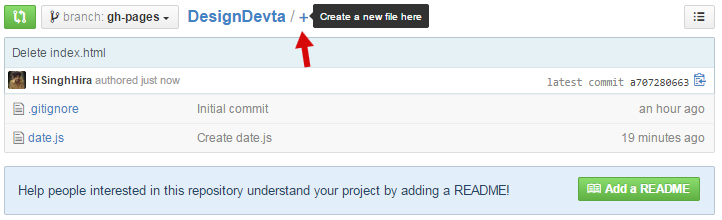

#2: Set File Name as index.html
#3: Paste redirecting codes from below in textarea.


<META content='0;URL=http://your-site-here' http-equiv='refresh'></META>

#4: Replace your-site-here with your site link/URL and Paste it in Textarea.


#5: Click on Commit new file.
#6: Done. Go to: http://github-username.github.io/repository-name 

Now if you go to my repository page (http://hsinghhira.github.io/DesignDevta) then it will redirected to this site.

Thank you for patronizing Design Devta. I am sure your visit to us must be quite satisfying and in line with your expectations from us. Just in case, it's not as you expected from us or if you are facing any problem, kindly forward your feedback's directly to us by leave a Comment below or using our Contact form. And, get assured response from my side. Your feedback's and suggestions are extremely valuable to us. This Post is written by Harman Singh Hira. There is no any source so Copying or using this post for your own site is not allowed. If anyone do so get ready for facing DMCA. Please, if you like this post then share on your social networking sites. Assuring you of our best service always.
Dual whatsapp Happy Diwali SMS Happy Diwali Whatsapp Status, SMS, Messages and Wishes Happy Diwali Shyari in Hindi

Wednesday, 25 March 2015

List of All Blogger Template's Codes


I'm a Blogger Template Designer so i know almost every Blogger Template's Code that need to build a Blogger Template. This list of Codes is very helpful for new Blogger Template Designer. Actually not only for Designers. Sometimes anyone want to show particular thing like comment numbered in his/her site. So this here is the list.

Conditional Tags

To Show something on Home Page only.
<b:if cond='data:blog.url == data:blog.homepageUrl'>
 Codes here
</b:if>

To Hide something from Home Page only.
<b:if cond='data:blog.url != data:blog.homepageUrl'>
 Codes here
</b:if>

To Show something on Post Pages.
<b:if cond='data:blog.pageType == "item"'>
 Codes here
</b:if>

To Hide something from Post Pages
<b:if cond='data:blog.pageType != "item"'>
 Codes here
</b:if>

To Show something on Pages.
<b:if cond='data:blog.pageType == "static_page"'>
Codes here
</b:if>

To Hide Something from Pages.
<b:if cond='data:blog.pageType != "static_page"'>
Codes here
</b:if>


To Show Something on particular URL.
<b:if cond='data:blog.url == "URL of the page"'>
Codes here
</b:if>

To Hide Something from Particular URL.
<b:if cond='data:blog.url != "URL of the page"'>
Codes here
</b:if>

To Show something on Post Pages and Pages.
<b:if cond='data:blog.url == data:post.url'>
Codes here
</b:if>

To Hide something from Post Pages and Pages.
<b:if cond='data:blog.url != data:post.url'>
Codes here
</b:if>

To Show Something on Home Page, Archive Page and Search Page
<b:if cond='data:blog.pageType == "index"'>
Codes here
</b:if>

To Hide Something from Home Page, Archive Page and Search Page
<b:if cond='data:blog.pageType != "index"'>
Codes here
</b:if>

To Show Something on Archive Page only.
<b:if cond='data:blog.pageType == "archive"'>
Codes here
</b:if>

To Hide Something from Archive Page only.
<b:if cond='data:blog.pageType != "archive"'>
Codes here
</b:if>

To Show Something on Error Page.
<b:if cond='data:blog.pageType == "error_page"'>
Codes here
</b:if>

To Hide Something from Error Page
<b:if cond='data:blog.pageType != "error_page"'>
Codes here
</b:if>

To Show Something on Search Page only.
<b:if cond='data:blog.searchLabel'>
Codes here
</b:if>

To Show Something on First Post only.
<b:if cond='data:post.isFirstPost'>
Codes here
</b:if>


Author Codes

Author Name:
 <data:post.author/>
Author Profile URL:
<data:post.authorProfileUrl/>
Author Image:
<data:post.authorPhoto.url/>

Time Stamp
<data:post.timestamp/>

Numbered Comments figure
<data:post.numComments/>

Full Comments Stamp
<b:if cond='data:post.allowComments'>
<b:include data='post' name='comment_count_picker'/>
</b:if>

Label(s)
<b:if cond='data:post.labels'>
<b:loop values='data:post.labels' var='label'>
<a expr:href='data:label.url' rel='tag'><data:label.name/></a><b:if cond='data:label.isLast != &quot;true&quot;'>,</b:if>
</b:loop>
</b:if>

Location
<b:if cond='data:top.showLocation'>
<b:if cond='data:post.location'>
<a expr:href='data:post.location.mapsUrl' target='_blank'><data:post.location.name/></a>
</b:if>
</b:if>

Email me
<b:if cond='data:post.emailPostUrl'>
<a expr:href='data:post.emailPostUrl' expr:title='data:top.emailPostMsg'>
<img alt='' class='icon-action' height='13' src='http://img1.blogblog.com/img/icon18_email.gif' width='18'/>
</a>
</b:if>

Post Edit Pencil Icon
<b:include data='post' name='postQuickEdit'/>

Thank you for patronizing Design Devta. I am sure your visit to us must be quite satisfying and in line with your expectations from us. Just in case, it's not as you expected from us or if you are facing any problem, kindly forward your feedback's directly to us by leave a Comment below or using our Contact form. And, get assured response from my side. Your feedback's and suggestions are extremely valuable to us. Please, if you like our this post then share on your social network. Assuring you of our best service always.

Tuesday, 24 March 2015

How to Enable WhatsApp Calling?


WhatsApp Messenger is an instant messaging app for smartphones that operates under a subscription business model. The proprietary, cross-platform app uses the Internet to send text messages, images, video, user location and audio media messages. In January 2015, WhatsApp was the most globally popular messaging app with more than 700 million active users, with India alone having a user base of more than 70 million.


Recently Whatsapp got new feature. That is "Free Whatsapp Calling". Yes, this is true. Now you can call free to your Whatsapp Contacts. WhatsApp calling support both Rooted and Non rooted phones. WhatsApp is rolling out this Calling feature on Invitation Basis. You need to get an Invite from a person who already got this WhatsApp calling feature.

Screenshots


How to Get WhatsApp Calling feature?

You need some requirements to get feature. Read below:
  1. Your Phone Must be Supported by WhatsApp.
  2. You Must have active WhatsApp account.
  3. You must update your WhatsApp application version 2.11.528 or 2.11.531, You can update WhatsApp from Playstore or from Whatsapp Site.
  4. You need an invite from a Person who already have WhatsApp Calling feature active.


It�s possible that WhatsApp may have set a limit to the number of users one could invite or is only allowing a limited set of users at this time to test its networks. So anyone who can make calls, can invite others and spread it.

Comment below that "I need this feature" and Send me your Whatsapp Phone number with your Name and Country Code by hitting below Contact me Button.

Contact me

Thank you for patronizing Design Devta. I am sure your visit to us must be quite satisfying and in line with your expectations from us. Just in case, it's not as you expected from us or if you are facing any problem, kindly forward your feedback's directly to us by leave a Comment below or using our Contact form. And, get assured response from my side. Your feedback's and suggestions are extremely valuable to us. Please, if you like our this post then share on your social network. Assuring you of our best service always.

Monday, 23 March 2015

How to make Instant Notepad in Browser?


A developer or any always looking for new codes or new sites. While browsing sometimes we need an instant temporary notepad to save a link, text or passage. First click on Start Button then Search for Notepad then paste in it; this process seriously very long. There are many Browser's Extensions that work as Notepad but these extension are heavy and can slow down your PC/Mac. My this trick is a Simple Trick. You can make an instant Temporary Notepad within a second with single click. This is Awesome, right? Use this feature anytime by saving it in your Bookmarks and Done.

Better Dark Notepad with Spelling Check

#1: Click here to open in new tab
#2: Drag below icon to your Browser's Bookmark bar.

Notepad

Better Dark Notepad without Spelling Check

#1: Click here to open in new tab
#2: Drag below icon to your Browser's Bookmark bar.

Notepad

Simple Notepad without any Style

#1: Click here to open in new tab
#2: Drag below icon to your Browser's Bookmark bar.

Notepad


Image Courtesy: Free Images Live

Thank you for patronizing Design Devta. I am sure your visit to us must be quite satisfying and in line with your expectations from us. Just in case, it's not as you expected from us or if you are facing any problem, kindly forward your feedback's directly to us by leave a Comment below or using our Contact form. And, get assured response from my side. Your feedback's and suggestions are extremely valuable to us. Please, if you like our this post then share on your social network. Assuring you of our best service always.

Sunday, 22 March 2015

How to Disable Apps Platform on Facebook?


Another post about Facebook. My first post on my this blog about "How to Block App Requests with three methods?" helps many but that post is for particular apps. In my today's post, i will show you that how you can disable your Facebook account for Apps. With this method, you will no more saw any app request in Notification. This is trick is great for those do not use any single app.


On the other hand, there are many disadvantages of this trick. If you use Log in with Facebook on Sites like Spotify, etc then you will no more use this feature. Many Users also added their Twitter and Instagram account their in Facebook. These Users also can't access their Twitter and Instagram through Facebook medium because these applications also work and run through/with Facebook apps and if you disable your Facebook apps then application no more access your account. This Trick only useful for; those uses Facebook for chatting, etc purpose only.

How to Disable Apps?

#1: Log in to Facebook
#2: Click on Settings
#3: Click on Apps Option from left side menu or click here


#4: Click on Edit button for Apps, Websites and Plugins.


#5: A popup will appeared. Then click on Blue Disable Platform Button.


#6: Done

Image Courtesy: Techtudo

Thank you for patronizing Design Devta. I am sure your visit to us must be quite satisfying and in line with your expectations from us. Just in case, it's not as you expected from us or if you are facing any problem, kindly forward your feedback's directly to us by leave a Comment below or using our Contact form. And, get assured response from my side. Your feedback's and suggestions are extremely valuable to us. Please, if you like our this post then share on your social network. Assuring you of our best service always.

Index your Post on Google in 3 Second [Trick]


Once you published a New Blog Post then you started waiting for Googlebot to crawl your new post to be indexed in Google. But it took many hours to index and sometimes days. This is also seen that if you have a new Blog and your traffic is not so much then Google do not index your less popular post. Now what to do in this kind of situations? Many other Bloggers give advise to submitting your Blog to Google Webmaster Tools for fast indexing but in reality, this is also not working for Less Traffic Blogs. 


But Now No-More waiting for Indexing. Here a Trick to Index your Post on Google within Seconds. I'm talking about Fetch as Google Tool in Webmaster Tools. Almost every Blogger has an account on Google Webmaster but we never saw it completely. Here I�m explaining about Fetch as Google tool, developed by Google Webmaster tools where you can submit your blog to crawl and indexed very fast. This is 100% working trick and safe. Many other sites posting many tricks to index fast through various ways but that's all tricks are illegal and against Google policies. Use this 100% safe trick.

So let's get Started

First if you do not have account on Google Webmaster Tools then Create new one and add your site to Webmaster tools. Then use below two steps:

Step 1:  Submit your Site's Sitemap.

#1: Go to Webmasters Dashboard and Click on your Site
#2: Then from the left side menu, Click on Crawl then Sitemaps.


#3: Click on Red "ADD/TEST SITEMAP" button.


#4: Enter sitemap.xml in Text field.


#5: Then Click Submit Sitemap.
#6: Refresh the Page. Done.


Step 2: Trick to Index Fast.

#1: Now, Click on Fetch as Google Option from Crawl.


#2: Enter your Post's URL but without Domain name, example below. Enter Red Text only.
http://designdevta.blogspot.com/2015/03/how-to-download-android-apps-in-pc-in.html

#3: Then Click on Fetch Button.
#4: Your URL Fetch properly.
#5: Click on Submit to index Button.


#6: A popup will Appeared. Choose Crawl only site URL Option and Click Go Button.


#7: Done.


Now your Post successfully Index on Google. If you want to check it then go to Google and Search for "site:your-post-link" or click here for example.
Note: You can only Fetch 500 URL in a Month.
Image Courtesy:  Financial Gazette

Thank you for patronizing Design Devta. I am sure your visit to us must be quite satisfying and in line with your expectations from us. Just in case, it's not as you expected from us or if you are facing any problem, kindly forward your feedback's directly to us by leave a Comment below or using our Contact form. And, get assured response from my side. Your feedback's and suggestions are extremely valuable to us. Please, if you like our this post then share on your social network. Assuring you of our best service always.

Friday, 20 March 2015

How to Download Android Apps in PC in one Click?


If you have Internet Broadband Plan in your PC but still paying for 2G/3G Data Plan for your Mobile because of Apps Updations and downloading Apps. Then why you shouldn't Download Android Apps directly in your computer from Google Play Store? Many of you thought that this is not possible but now it is. Now no need to pay for 2G/3G Plans. No matters how long your app is. You can easily download it from your Google Play Store in your PC then later transfer it in your Mobile through USB Wire. There is also no need to Sign in your Account. You can download the App anonymously from your computer. 


How to Download?

#1: Go to Google Play Store and search for your App that you want to Download and Install.
#2: Copy the Full URL from your Browser's Address bar.


#3: Click here and Paste Copied URL in Text Field then Click 'Generate Download Link' Blue Button.
(Wait for few seconds or maybe for minute while generating download link.)
#4: Atlast click on Green Button as in below Image.


#5: Done.


Troubleshooting

If Site Showed Error like Invalid token something then reload the page and start again.


Thank you for patronizing Design Devta. I am sure your visit to us must be quite satisfying and in line with your expectations from us. Just in case, it's not as you expected from us or if you are facing any problem, kindly forward your feedback's directly to us by leave a Comment below or using our Contact form. And, get assured response from my side. Your feedback's and suggestions are extremely valuable to us. Please, if you like our this post then share on your social network. Assuring you of our best service always.

Thursday, 19 March 2015

Who Unfriended you on Facebook? Check Now


After my yesterday's Post "How to Disable Facebook Autoplay Video"; i'm back with my new post again about Facebook. Facebook is largest Social Media Network having 100 millions Users around the world. Facebook is the best way to stay connected with our Friends and Family members, and for some 'Unknowns' also. Facebook limit for making friends is 5000. Facebook gives all option to filtering friends by Current City, birthdays, Hometown and many more except Lost Friends. Friends those remove you from their friend list. So here a way to find out.


#1: By Installing Extensions
  1. Install the Extensions for your Browser. For Chrome & For Firefox.
  2. Done. Now it will notify you whenever someone remove you from his/her List.
  3. You can also check this by go to you friend list then click on Lost Friends Option.


#2: Some Online Methods
  1. Who Unfriended me
  2. Sadly Unfriended

Thank you for patronizing Design Devta. I am sure your visit to us must be quite satisfying and in line with your expectations from us. Just in case, it's not as you expected from us or if you are facing any problem, kindly forward your feedback's directly to us by leave a Comment below or using our Contact form. And, get assured response from my side. Your feedback's and suggestions are extremely valuable to us. Please, if you like our this post then share on your social network. Assuring you of our best service always.

Wednesday, 18 March 2015

How to Disable Facebook Autoplay Videos?


My recent article about Facebook that "How to Report Suicidal Post to Facebook" helps many readers. In my this Article helps you to disable Auto-Play Videos in Facebook. Maybe, you should that Facebook launches their new feature regarding Videos. When any Video on Facebook Home Page comes then it started playing without your command. Videos started playing without sound. Feature is recommended for good speed internet and unlimited data plan. For others, this feature used lots of KB. So, here are some simple step to disable this feature. Read it carefully:


How to Disable it?

#1: Login to Facebook and Go to Settings.
#2: Click on the Videos (Last option on Left side Menu)
#3: Now Off it for Autoplay Videos.


How to Disable in Smartphones?

#1: Click Settings
#2: Then go to App Settings (at Last)
#3: Now find Autoplay Videos Option and make it Off.

Image Courtesy: Mashable 

Thank you for patronizing Design Devta. I am sure your visit to us must be quite satisfying and in line with your expectations from us. Just in case, it's not as you expected from us or if you are facing any problem, kindly forward your feedback's directly to us by leave a Comment below or using our Contact form. And, get assured response from my side. Your feedback's and suggestions are extremely valuable to us. Please, if you like our this post then share on your social network. Assuring you of our best service always.

Tuesday, 17 March 2015

Indian Government Launches "Digilocker" Cloud Storage

Ministry of Communications and Information Technology under the Government of India has launched a personal cloud space for the Indian Citizens. Instead of storing your important documents in scanned form in your computer, Google Drive or in some other third party cloud space like Dropbox, now you�ve got a fully secure platform owned by your own government.


Digilocker is your personal dedicated storage space which will be linked to each Citizen�s Aadhar number. This will be used to securely store the documents, as well as store the Uniform Resource Identifier (URI) link of e-documents issued by different government departments. This e-signing facility will be a part of the Digilocker arrangement and you will be able to avoid all the paperwork and digitally sign your e-documents.

How to avail the Digilocker facility:

Using Digilocker and the registration part is a very simple task. To sign-up for the Digilocker service, you�ll need an Aadhaar number and a mobile number registered with the same.
  1. Now open the Digilocker.gov.in website and type the Aadhar number and the captcha code.
  2. Now click the sign-up button which will create your user id and send an OTP � One Time Password � to your registered mobile number and email address.
  3. After this step, enter the OTP at desired place and click on the �Validate OTP� to complete the sign-up. Now login using user id and password.

Digilocker is part of Indian Government�s Digital India campaign which aims at making the technological advancements the chief force to bring the change. Recently India Prime Minister Narendra Modi launched a contest in partnership with Google inviting ideas to create a mobile app for the Prime Minister�s Office.

This Digilocker service will minimize the physical documents� user and people can easily trust a government owned cloud service with their precious documents which will also make the e-documents authentic. Overall, it will help the Citizens and government to work in a better way to ensure proper delegation of services.

Thank you for patronizing Design Devta. I am sure your visit to us must be quite satisfying and in line with your expectations from us. Just in case, it's not as you expected from us or if you are facing any problem, kindly forward your feedback's directly to us by leave a Comment below or using our Contact form. And, get assured response from my side. Your feedback's and suggestions are extremely valuable to us. Please, if you like our this post then share on your social network. Assuring you of our best service always.

How to Use Internet Offline in all Browsers?


As Mozilla and Internet Explorer already offer a �Work Offline� option to save and read later, Google chrome also has a similar feature hidden inside to do the same. In 2013, Randy Smith, Chrome networking engineer, implemented the support for an Offline Cache Mode in chrome. When you enable this feature, you'll be able to navigate through the saved content in cache. Here i mentioned the way to work offline in all major browsers.

Google Chrome

#1, Type chrome://flags/ in Address bar.
#2, Search for Enable Offline Load Stale Button by typing Ctrl + F.
#3, Enabled it from disable.


#4, Atlast, Reset the Browser.


Mozilla Firefox

#1, Open Mozilla Firefox.
#2, Click on File
#3, Select Work Offline Option (Last Second)

#4, Done

Internet Explorer

#1, Start Internet Explorer.
#2, On the File menu, determine whether the Work Offline option is enabled. 
#3, Done


Opera

#1, Go to Settings > Preferences > Advanced > History and make sure that Cache is "On", 
#2, Uncheck "Empty on Exit".
#3, Select Settings > Work Offline.
#4, Done

Safari

Not yet available.... 

Thank you for patronizing Design Devta. I am sure your visit to us must be quite satisfying and in line with your expectations from us. Just in case, it's not as you expected from us or if you are facing any problem, kindly forward your feedback's directly to us by leave a Comment below or using our Contact form. And, get assured response from my side. Your Feedback's and suggestions are extremely valuable to us. Please, if you like our this post then share on your social network. Assuring you of our best service always.

Monday, 16 March 2015

Add Review Schema in Blogger Templates


I'm hesitant to either use superlatives or make predictions concerning search engine innovations, but the joint announcement by Google, Yahoo and Bing introducing schema.org is, in my opinion, pretty big news.  Schema.org at once provides a mechanism by which semantic web technologies can become a lot more mainstream, and at the same time offers the possibility of superior search visibility for search marketers that embrace this standardized, structured on-page markup.


We all know that Schema SEO used for WordPress is easy. There are lots of plugin for WordPress to improve SEO for Site. But we can't say that Blogger Templates has lack of SEO setting. Almost all premium templates and few free templates too has good SEO setup for better indexing Blogger Blog.

But, there is something that still do have in Blogger Templates reagarding SEO Schema. That is 'Review Schema". If you ever search on Google about IMDB Movie then you must saw the rating stars, votes, etc on Google Search result. 


I added these Schema Review codes in my this Blog and hureee! Google start indexing my posts with review. Check the image below or click here


How to add it on Blogger?

Well, good question. We can't add votes on blogger but atleast we can add Stars, Rating and Reviewed by in Blogger. Here are some simple codes. Add them in Blogger Template above or below <data:post.body/> Tag.

<div style='height:0px;visibility: hidden;'>
<div itemscope='' itemtype='http://data-vocabulary.org/Review'>
<span itemprop='itemreviewed'><data:post.title/></span><br/>
<span itemprop='reviewer'><data:post.author/></span><br/>
<span itemprop='rating'>5</span> of 5
<div itemprop='description'><data:post.snippet/></div>
</div></div>

You can use Google's Structured Data Testing Tool to check my site Review Schema.


I hope this will helps you too. If you have any suggestions then please share with us. This Trick is found by Harman Singh Hira so anyone using the above codes without giving proper credit-back link to me or my site would have to face some legal issue. Therefore, do respect the work.

Thank you for patronizing Design Devta. I am sure your visit to us must be quite satisfying and in line with your expectations from us. Just in case, it's not as you expected from us or if you are facing any problem, kindly forward your feedback's directly to us by leave a Comment below or using our Contact form. And, get assured response from my side. Your feedback's and suggestions are extremely valuable to us. Please, if you like our this post then share on your social network. Assuring you of our best service always.

Thursday, 12 March 2015

Google Code Shutting Down Soon

Google Code shutting down on Jan 25, 2016. For Blogger template developers, Google Code is used to host javascript and CSS files. There are almost 70% of Blogger Template that run with the help of Google Code and if Google soon closed this service then many Blogger templates will stop working. Google give us a to export our Google Code work to Github but this is not possible for all. Below is the Email sent be Google regarding my Google Code Projects.
Hello,
Earlier today, Google announced we will be turning down Google Code Project Hosting. The service started in 2006 with the goal of providing a scalable and reliable way of hosting open source projects. Since that time, millions of people have contributed to open source projects hosted on the site.
But a lot has changed since 2006. In the past nine years, many other options for hosting open source projects have popped up, along with vibrant communities of developers. It�s time to recognize that Google Code�s mission to provide open source projects a home has been accomplished by others, such as GitHub and Bitbucket.
We will be shutting down Google Code over the coming months. Starting today, the site will no longer accept new projects, but will remain functionally unchanged until August 2015. After that, project data will be read-only. Early next year, the site will shut down, but project data will be available for download in an archive format.
As the owner of the following projects, you have several options for migrating your data.
  1. Project 1
  2. Project 2
The simplest option would be to use the Google Code Exporter, a new tool that will allow you to export your projects directly to GitHub. Alternatively, we have documentation on how to migrate to other services � GitHub, Bitbucket, and SourceForge � manually.
For more information, please see the Google Open Source blog or contact google-code-shutdown@google.com.
-The Google Code team
Thank you for patronizing Design Devta. I am sure your visit to us must be quite satisfying and in line with your expectations from us. Just in case, it's not as you expected from us or if you are facing any problem, kindly forward your feedback's directly to us by leave a Comment below or using our Contact form. And, get assured response from my side. Your feedback's and suggestions are extremely valuable to us. Please, if you like our this post then share on your social network. Assuring you of our best service always.

Wednesday, 11 March 2015

How to Make Money by Making Friends?


You may have used Facebook for last 5-6 years, but haven't found anything useful in terms of revenue. Well that�s because you are not getting any money or any gift voucher from Facebook. Well here is the solution for it. The New Social Networking Site like  Facebook, but gives its 90% of its revenue to the users. Tsu-Social network which gives social revenues back to you. But unlike Facebook you just can�t sign up into it just by typing your name and giving an email address. You need to have a invitation or Tsu verified profile links.(Which we are ready to provide you). Copy the link below to join Tsu and follow them to know more about revenue making from Tsu.


Lets come to money making matter.Well as per the guidelines from Tsu a person with average number of friends of 300 can earn upto 15$-20$ a day. Since Tsu itself does not invite anyone to the platform, it gives its users a short code to invite other members and distributes 90% of the revenue from its ads back to the users. This unique architecture creates an on-going revenue stream for its everyday users.  This method will incentivize users to invite friends. The larger a user�s �network�, the more money they can make.

They give credits or money to friends, tap into other apps that user credit products, and Tsu is supposedly going to have an online store where users can buy items directly from them. Lastly, if the user just wants the money, the user can fill out a W9 form and just have Tsu send them a check.  This system is built for charities, musicians, athletes, writers, photographers, YouTubers, businesses.
Tsu is a payment platform working in conjunction with a social-networking platform. Tsu find sponsors, partners and advertisers to advertise on its users pages and then passes 90% of that revenue back to the users.  Just imagine if Lacoste paid you for wearing their shirt with the alligator and would pay you more if you went to a concert or mall where a lot of people saw it. That�s basically how Tsu works!

How much we can Earn?

Tsu is a free social networking platform where all of money is made from the platform are distributed to the users in the form of royalties � after all, it is your content & your audience. Again, Tsu brings in money from 3rd parties, namely ads, sponsorships & partnerships. That money is then distributed to the users by giving 50% of any revenue created going directly to the content creator (this is similar to the YouTube or Soundcloud monetization models). The other 50% is distributed via an infinite series of 1/3�s up a family tree, which is created through a short code invitation. In the tree, 1/3 of any user�s generated economic goes to whoever invited them to the platform. Then 1/3 of 1/3 goes to whoever invited that user and 1/3 of 1/3 of 1/3 goes to whoever invited that user, etc. This network math propagates infinitely up the family tree, summing to 50%. So, in the end 50% goes to the content creator & 50% goes to the network who brought them to Tsu. For our efforts, we take a 10% fee once economics are created.


In a practical sense, it would look something like this:

  • User A invites User B
  • User B invites User C
  • User C invites User D
  • User D invites E to join.

E has 50M users following him and posts a unique picture of his new car and 10M users see this adding a bunch likes and comments.  Advertisers have agreed to run ads where they would pay $1 for every 1000 people that see their ad (Called a CPM or Cost Per 1000 views).

Tsu collects $10,000 from the advertisers and keeps 10% or $1,000. Of the $9,000 remaining,

  • E keeps 50% or $4,500. 
  • User D who directly invited E would get 1/3 of the remaining $4,500� $1,500. 
  • User C who invited D would get 1/3 of 1/3 or $500
  • User B who invited User C would get 1/3 of 1/3 of 1/3 or $166.67
  • User A who invited User B would get 1/3 of 1/3 of 1/3 of 1/3 or $55.55

This trend continues until it is 100% of the revenue.

We have done some mathematics calculations and it appears that an average user should make about $1-3 per day for every 100 friends/followers they have. According to Pew Research Report the average Facebook User has 338 friends which would equate to the average user on Tsu making $3.38�10.14 per day.

You can Make Double Ad Revenue

Tsu itself does not host videos. They integrated with leading video hosting platforms, some of which monetize views for the creator of the content. They encourage users to post their videos to a YouTube channel, monetize the videos there and simply put that YouTube video link onto Tsu. If anyone seeing that video link posts it on Tsu, it will monetize on Tsu and if the audience plays your YouTube-monetized video in a YouTube player, you will monetize on YouTube as well. With Tsu, you get credit for just showing your audience the preview of your video.

You can actually make money 3 ways by combining Tsu with YouTube and following these steps:

  1. Publish your video on YouTube, unlist it and ensure it is monetized on YouTube;
  2. Then, take the YouTube video link and publish it on your Tsu page where it will show a preview of the video;
  3. Last, take your Tsu short code and announce everywhere that you have a new video on your
  4. Tsu network.
  5. This method allows you to make money on YouTube, on Tsu and any new Tsu user wanting to see your video forever is tied to you and you earn 33.3% of the revenue they create in perpetuity and about 11% of their audience�s income that they make forever.
If you share Copyrighted material on Tsu and they receive a notification/infringement claim, the content gets removed immediately.  All material must abide by the Digital Millennium Copyright Act or DMCA.

Thank you for patronizing Design Devta. I am sure your visit to us must be quite satisfying and in line with your expectations from us. Just in case, it's not as you expected from us or if you are facing any problem, kindly forward your feedback's directly to us by leave a Comment below or using our Contact form. And, get assured response from my side. Your feedback's and suggestions are extremely valuable to us. Please, if you like our this post then share on your social network. Assuring you of our best service always.

Monday, 9 March 2015

How to Make Money Online? (Best 7 Ways)


So many sites that promise to give you a price for your work but in fact they do not. We should try to stay away from such sites. But we can not say that all these kinds of sites are fraud. There are many sites that gives you the value of your work fairly. So i'm trying to explained about such good sites that helps you to earn some money. There are many ways to earn money online and they actually paid you. Read the ways below:


#1 Make a Blog/Site

Many readers thinks that this is not easy way. Some thinks that this is expensive way. But in reality, you do not need to spend any single penny. Just go to Blogger.com and log in with your Gmail or any other Google account. Create a Blog free and start blogging. Yes, this is true that you need some ideas and skills to post. Start Blogging about anything i.e. Internet, Painting, Social Media, News, etc. Then apply for Ads on various sites like Adsense, etc. But you have to be very patient. This way don't start earning instantly but this is effective way. With this, you can earn good and for long term.

#2 Paid to Click (PTC)

Paid to Click is a another way to earn money online. In this way, you do not need to create any Blog or Site and can do without any knowledge. All you need to do is, just signup for any PTC Site then view ads for 30 Seconds to 1 Minute. You need to do this daily. Simple way to Earn. Choose your PTC Site here but keep away from Scam Sites.

#3 Gigs on Fiverr

Fiverr is now the world�s largest marketplace for people to make money selling small services (known as �gigs�). What you offer could be absolutely anything, from writing and translating, social media posting, playing pranks and teaching to creating music, voiceovers and short video clips for people all around the world! The default price is $5 (hence Fiverr..), but you can attach extra services to gigs for more money. Whilst it might not seem like much, it can quickly add up and there are plenty of examples of people making a really good living from the site. The key is to get a system in place which minimises the time spent on each gig.


#4 Sell your Photos

If you think you've got a good shot and a little creativity, try uploading your photographs for free to stock websites. A good starting point is Fotolia or istockphoto. Make more money selling photo subjects that people are demanding, and there�s a great resource to find this out here.

#5 YouTube Videos

According to recent stats we now watch more videos on YouTube than searches on Google. And with the recently introduced YouTube Partner Program you can now profit from making and uploading videos. You will receive a percentage of the advertising revenue collected per 1,000 views.
Depending on how successful you are (virality, subscriber base and topic) you can make a lot of money, and there are plenty of stories every week of more and more YouTubers making it their career.

#6 Paid Writing

If maintaining a blog is difficult for you but you still want to indulge your passion for writing, you can jot down articles for other blogs or sites such as Weblogs, Helium or PayPerPost. Writing an e-book can also be a good option. E-books are investment free, with no cost for printing and shipping. If you have a strong command over languages, you can become a copy editor, where Webmasters will pay you to read articles and correct grammatical errors, sentence fragments, etc.

#7 Making Themes or Templates

As more and more people seek an online presence, the demand for Blogger Templates, Website templates and WordPress themes will keep increasing. If you are good at Web designing and coding, you can earn a lot from designing Web themes. In this segment, there are mainstream Websites, such as TemplateMonster and ThemeForest, which act as a marketplace where you can sell your themes. Templates are sold and priced depending on the rights and features that are bundled with them.

Image Courtesy: Prudential Finance

Thank you for patronizing Design Devta. I am sure your visit to us must be quite satisfying and in line with your expectations from us. Just in case, it's not as you expected from us or if you are facing any problem, kindly forward your feedback's directly to us by leave a Comment below or using our Contact form. And, get assured response from my side. Your feedback's and suggestions are extremely valuable to us. Please, if you like our this post then share on your social network. Assuring you of our best service always.
website developed and designed by Manthan dudeja .. Powered by Blogger.

Featured Posts

Popular Posts

About Author (Do Not Edit Here!)

Search Bar

Navigation-Menus (Do Not Edit Here!)

Navigation-Menus (Do Not Edit Here!)